
TL;DR:
- Improving website UX can significantly boost small business conversions and customer retention.
- Common UX issues like slow load times and confusing navigation drive visitors away.
- Regular testing and updates are essential for maintaining a user-friendly, mobile-responsive website.
Most small business owners in Texas assume their website just needs to look good. That belief costs real money. User experience shapes every click, every scroll, and every decision a visitor makes on your site. When UX is poor, people leave fast and rarely come back. When it works, visitors stay longer, trust you more, and buy. This guide breaks down what website user experience actually means, why it matters to your bottom line, and how you can start improving it today without a big budget or a design degree.
Table of Contents
- What is website user experience and why it matters
- How improved UX drives real results for small businesses
- What makes a good UX: Features, frameworks, and quick wins
- Simple steps to boost your website UX in Texas
- What most Texas businesses miss about website UX
- How Digital Biz Agent can help your website grow
- Frequently asked questions
Key Takeaways
| Point | Details |
|---|---|
| UX is not just design | User experience covers the whole customer journey, including usability and accessibility. |
| Small changes, big ROI | Simple, affordable UX updates can boost conversion rates and profits dramatically. |
| Prioritize mobile and bilingual | Mobile responsiveness and bilingual features help Texas SMBs win local customers. |
| Test and iterate regularly | Regularly review and update your website’s UX using free tools for ongoing growth. |
What is website user experience and why it matters
Website user experience, or UX, is how a visitor feels and functions while using your site. It is not just about colors or fonts. UX covers usability, accessibility, consistency, responsiveness, and the full customer journey from the moment someone lands on your page to the moment they call, buy, or leave.
Think about the last time you visited a website on your phone and the menu was impossible to tap, the text was tiny, or the page took forever to load. You probably left. Your customers do the same thing.
Here are the most common UX problems that drive visitors away from small business websites:
- Slow page load times (more than 3 seconds loses most visitors)
- Confusing or cluttered navigation menus
- Forms that are hard to fill out on a phone
- Text that is too small or hard to read
- No clear next step or call to action
- Pages that look broken on mobile devices
Each of these issues is a friction point. Friction means a visitor has to work harder to get what they need. The more friction, the faster they leave. Understanding website design terminology helps you spot these problems before they cost you customers.
Good UX removes friction. It guides a visitor naturally from curiosity to contact. That means your site loads fast, your menu makes sense, your phone number is easy to find, and your pages look clean on any screen.
"Well-executed UX improvements have been shown to boost conversion rates by up to 400%." This is not a design luxury. For a Texas small business, that kind of lift can mean the difference between a slow month and a record one.
UX also affects how long people stay on your site. Search engines like Google track that time. If visitors leave quickly, Google assumes your site is not helpful and ranks it lower. Better UX means better SEO, more traffic, and more sales. It is all connected.
How improved UX drives real results for small businesses
Let's talk numbers. UX is one of the highest-return investments a small business can make. $1 invested in UX can return between $2 and $100, and a 5% boost in customer retention can increase profits by 25% to 95%. Those are not marketing slogans. Those are benchmarks from real research.
Here is a simple before-and-after look at what UX improvements can do for a typical Texas small business website:
| Metric | Before UX fix | After UX fix |
|---|---|---|
| Bounce rate | 75% | 45% |
| Average visit time | 45 seconds | 2.5 minutes |
| Contact form submissions | 3 per week | 10 per week |
| Mobile conversion rate | 1% | 3.5% |
| Monthly revenue from site | $800 | $2,400 |
These numbers are rough estimates, but they reflect real patterns seen across small business websites. The changes that drive these results are often simple: faster load times, a cleaner layout, a visible phone number, and a mobile-friendly form.
For Texas small businesses, the ROI is especially strong because local competition is growing online. Businesses with modern website features and solid responsive design consistently outperform those that ignore UX.
Typical business outcomes after UX improvements include:
- More inbound calls and contact form submissions
- Higher average order value from online shoppers
- Better Google reviews because customers had a smooth experience
- Lower ad spend needed to get the same number of leads
- More repeat visitors and referrals
Pro Tip: Before making any UX changes, write down 2 or 3 key metrics you want to improve, such as contact form fills or time on site. Check them again 30 days after your changes. That comparison tells you exactly what worked.
What makes a good UX: Features, frameworks, and quick wins
You do not need a $10,000 redesign to improve UX. You need the right features and a simple process. Lean UX, heuristic evaluation, and mobile-first strategies are proven approaches that work well for small businesses with limited time and budgets.
Here are the features that matter most for Texas SMB websites:
- Mobile responsiveness: Your site must look and work perfectly on phones. Over 60% of local searches happen on mobile.
- Fast load speed: Aim for under 3 seconds. Every extra second costs you visitors.
- Bilingual support: Texas has a large Spanish-speaking population. A bilingual site opens your business to more customers.
- Clear navigation: Limit your main menu to 5 or 6 items. Each one should have an obvious purpose.
- Consistent branding: Same colors, fonts, and tone across every page builds trust fast.
Here is a quick comparison of three UX approaches that fit different SMB needs:
| Method | Time needed | Cost | Best for |
|---|---|---|---|
| Lean UX | Low | Free to low | Fast iteration, small teams |
| Heuristic evaluation | Medium | Free to low | Finding usability problems quickly |
| Full usability testing | High | Medium to high | Major redesigns or new launches |
For most Texas small businesses, Lean UX and heuristic reviews give the best results fastest. Check out website essentials for small business to make sure your site covers the basics before testing anything advanced.
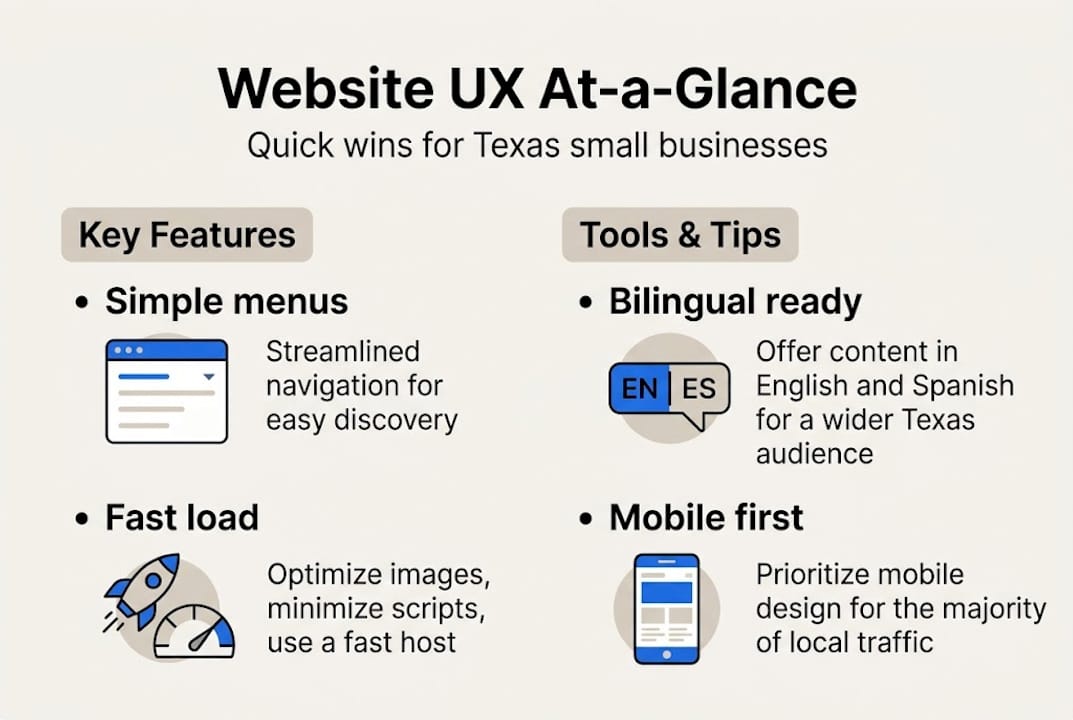
For bilingual sites, plugins like WPML or Polylang work well with WordPress. They let you create separate English and Spanish versions of each page without rebuilding your site. Explore affordable optimization steps to layer these improvements in without blowing your budget.
Pro Tip: Ask 3 to 5 people in your local community to use your website while you watch. Do not help them. Just observe where they get confused. That 20-minute test will reveal more than any analytics tool.
Simple steps to boost your website UX in Texas
Here is a clear, step-by-step process you can follow right now. No coding skills required.
- Run a basic audit. Walk through your own website like a first-time visitor. Check every page, every link, and every form. Write down anything that feels slow, confusing, or broken.
- Check your speed. Use Google PageSpeed Insights (free) to test your load time. It gives you a score and tells you exactly what to fix. Aim for a score above 70 on mobile.
- Test on mobile. Pull up your site on your phone and a friend's phone. Try to complete a task, like finding your phone number or filling out a contact form. If it feels hard, your customers feel the same way.
- Trim your navigation. If your menu has more than 6 items, cut it down. Group related pages under dropdowns. Every extra choice slows a visitor down.
- Add a bilingual toggle. If you serve Spanish-speaking customers, add a language switch to your homepage. Heuristic reviews and guerrilla testing show that bilingual features significantly improve trust and conversions for local and bilingual audiences in Texas.
None of these steps require a designer or a developer. Most can be done using your existing website platform, free plugins, or simple settings changes. If you use WordPress, most of these fixes take under an hour.
For deeper improvements, look at client-focused web design strategies that put your customer's needs first at every stage.
Pro Tip: Set a calendar reminder to repeat this UX review every 6 months and after any major update to your site. UX is not a one-time fix. It is an ongoing habit.
What most Texas businesses miss about website UX
Here is something most guides will not tell you. The biggest UX mistake Texas small businesses make is not a bad design choice. It is treating UX as a one-time project.
Most local businesses refresh their homepage photo, pick a new color scheme, and call it done. But the real problems, slow forms, broken mobile menus, English-only content, stay untouched. Those are the things that actually cost you customers.
In Texas, bilingual and mobile experiences are not optional extras. They are baseline expectations for a large portion of your potential customers. Ignoring them is leaving money on the table every single day.
We have also seen that businesses obsess over expensive tools and trend-chasing redesigns when the answer is simpler. Real people testing your site for 20 minutes will tell you more than a $500 analytics subscription. Feedback from your actual customers beats any framework.
The businesses that win online are the ones that keep testing, keep listening, and keep adjusting. Updating your website in 2026 is not about chasing the latest trend. It is about removing the friction that stands between your business and your next customer.
How Digital Biz Agent can help your website grow
You now have a clear picture of what good UX looks like and where to start. If you want hands-on help applying these steps to your specific business, Digital Biz Agent is built for exactly that.

We specialize in building mobile-friendly, bilingual, and SEO-optimized websites for Texas small businesses, starting at $50 per month. Our affordable UX and design services cover everything from initial audits to full launches. You can review our key website features to see what we include as standard. And if you are ready to get started, check our website pricing for a plan that fits your budget. No guesswork. No surprise fees.
Frequently asked questions
What is the difference between user experience and website design?
User experience is broader than visual design. UX covers the entire visitor journey, including usability and accessibility, while design focuses mainly on how the site looks.
How do I make my website bilingual for Texas customers?
You can use plugins like WPML or Polylang with WordPress to add bilingual support quickly. Bilingual features can be set up using free tools without rebuilding your site.
What free tools can help improve website UX?
Google PageSpeed Insights, Figma (free plan), and Hotjar (free plan) are strong starting points. Free tools like PageSpeed give you actionable data without any cost.
How often should small businesses review website UX?
Review your UX at least every 6 months or after any major site update. Frequent UX testing keeps your site aligned with how real customers actually use it.