Getting a website up and running feels like a big task when you're managing a small business in Texas. You're juggling customers, operations, and finances, and the last thing you need is a confusing, expensive web project that drags on for months. The good news is that building an affordable, modern, and SEO-optimized website does not have to be complicated. This guide walks you through every stage, from planning and design to launch and testing, with practical steps built specifically for Texas entrepreneurs who want results without the runaround.
Table of Contents
- Preparing for your website design project
- Step-by-step website design process
- Avoiding common website design mistakes
- Testing your website: Ensuring quality and launch-readiness
- Affordable help for Texas website success
- Frequently asked questions
Key Takeaways
| Point | Details |
|---|---|
| Plan before you build | Clarify goals and features so your website delivers what your business needs. |
| Mobile and SEO matter | A modern, responsive site with basic SEO helps you reach more Texas customers. |
| Avoid common pitfalls | Skipping mobile design or clear navigation can hurt your results and turn away visitors. |
| Test for quality | Check speed, compatibility, and feedback before launch to deliver a smooth experience. |
| Affordable help is available | Local services can provide expert support, maintenance, and custom solutions for your website. |
Preparing for your website design project
Before you touch a single design tool, you need a clear plan. As noted in the Texas website design process, planning is the most critical stage for small business websites. Skipping this step is one of the fastest ways to waste money and time.
Start by defining what you want your website to do. Ask yourself:
- Do you want to attract new local clients in Texas?
- Will you showcase services or sell products online?
- Do you need appointment booking or contact forms?
- Will you need bilingual content in English and Spanish?
Once you know your goals, list the features your site must have. Essential features for most Texas small business websites include mobile responsiveness, service listings, customer testimonials, a contact form, and clear calls-to-action. Review the professional web design guide for a full breakdown of what modern sites need.
Next, set a realistic budget. Many business owners underestimate costs or overspend on features they do not need. Here is a quick comparison to help you decide between DIY and professional options:
| Option | Avg. monthly cost | Time to launch | SEO included | Support |
|---|---|---|---|---|
| DIY website builder | $15 to $40 | 2 to 8 weeks | Limited | Self-serve |
| Freelance designer | $500 to $3,000 upfront | 4 to 12 weeks | Varies | Limited |
| Professional agency | $50 to $150/month | 1 to 4 weeks | Yes | Ongoing |
For most Texas startups, a professional agency with a monthly plan offers the best balance of cost, speed, and quality. The website design process steps outlined by industry experts confirm that working with a professional from the start reduces costly revisions later.
Step-by-step website design process
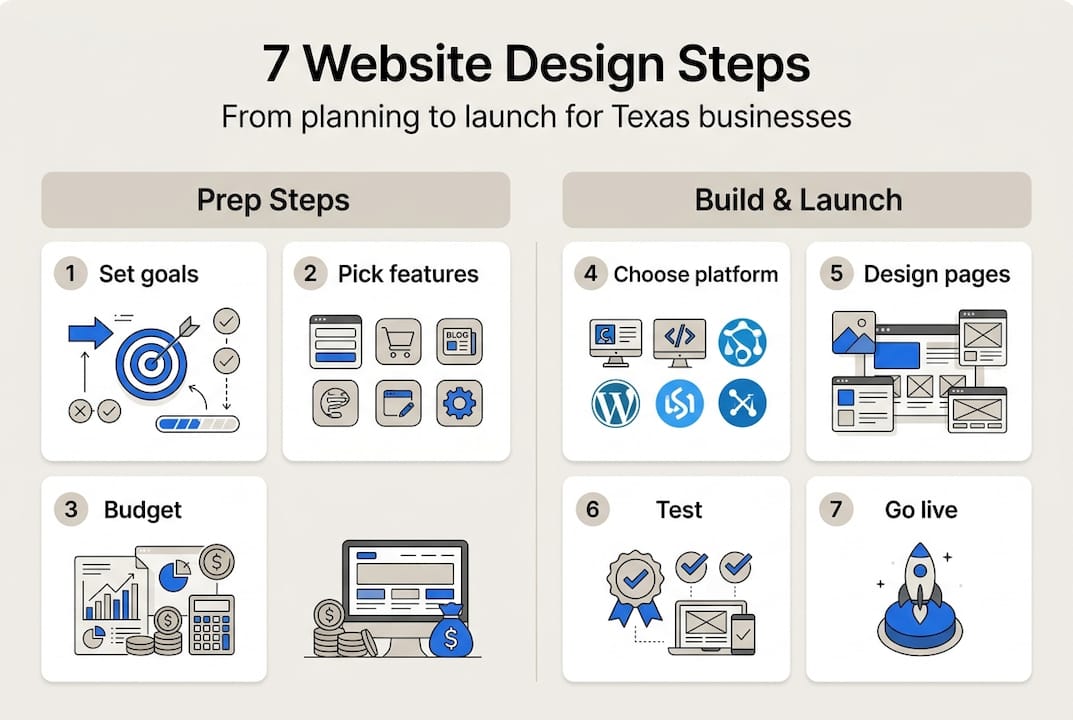
With your foundation set, now it is time to move through each key step and bring your website to life.
- Choose a domain and hosting. Pick a domain name that includes your business name or a local keyword like your city in Texas. Use reliable hosting with strong uptime and fast load speeds.
- Select a design template or custom solution. Templates save time and money. Custom designs give you more control. For most small businesses, a well-configured template works perfectly.
- Build your core pages. Every site needs at minimum: a home page, an about page, a services page, and a contact page. Keep navigation simple and logical.
- Ensure mobile-friendly formatting. Resize images, use readable fonts, and test button sizes on small screens. Check out these modern website tips for layout guidance.
- Incorporate SEO basics. Add your target keywords to page titles, headings, and meta descriptions. Include your business address and link to Google Maps for local search. Websites built with SEO from the start perform better in search rankings.
- Add security features. Install an SSL certificate (the padlock in the browser bar), add a privacy policy, and make sure your contact forms are protected. Review custom website design tips for security best practices.
- Launch and test across devices. Open your site on a phone, tablet, and desktop before going live. Fix any broken links, slow images, or layout issues.
Pro Tip: Build your site in mobile view first. Over 70% of visitors browse on smartphones, so designing for small screens first ensures a better experience for the majority of your audience.

Here is a quick reference table for each step:
| Step | Action | Expected outcome |
|---|---|---|
| Domain and hosting | Register domain, set up hosting | Site is live and accessible |
| Template or custom | Choose design approach | Visual framework is ready |
| Core pages | Write and publish content | Site has full structure |
| Mobile formatting | Test and adjust layout | Smooth experience on all devices |
| SEO basics | Add keywords and metadata | Better Google visibility |
| Security | SSL, privacy policy, forms | Safe and trustworthy site |
| Launch and test | Cross-device review | Bug-free, ready for visitors |
For a deeper look at each stage, the Texas website design guide and this website design guide from Inc. are both solid references.
Avoiding common website design mistakes
Even the best design plan can unravel if you run into common pitfalls. Here is how to stay clear.
These are the most frequent mistakes Texas small business owners make:
- Poor navigation. If visitors cannot find what they need in two clicks, they leave. Keep your menu simple with no more than five to six items.
- Slow loading speed. Large image files are the top culprit. Compress every image before uploading.
- Non-responsive design. Ignoring mobile design causes high bounce rates, meaning visitors leave immediately without engaging.
- No clear call-to-action. Every page needs one obvious next step: call now, book a consultation, or get a free quote.
- Overspending on unnecessary features. Texas startups often pay for complex features they do not use. Start simple and scale up.
Review the must-have website features checklist to make sure you are covering the basics without overbuilding. If your current site already has these problems, check the signs for redesign to know when it is time to start fresh.
Common website mistakes documented by Entrepreneur confirm that layout and navigation issues are the top reasons visitors abandon small business sites.
"Modern website features drive 30% more engagement for small and medium-sized businesses compared to outdated designs."
Pro Tip: Avoid image overload. One strong, relevant photo per section is more effective than five average ones. Clean layouts load faster and keep visitors focused on your message.
For ongoing maintenance, schedule a monthly review of your site. Update content, check for broken links, and refresh any outdated service information. This takes less than an hour and keeps your site performing well.
Testing your website: Ensuring quality and launch-readiness
Once your design is finished, rigorous testing ensures that all your hard work pays off with a site that is ready to impress.
Follow this quality assurance checklist before you hit publish:
- Speed test. Use a free tool like Google PageSpeed Insights. Aim for a score above 80 on mobile.
- Device compatibility. Open the site on at least three devices: a smartphone, a tablet, and a desktop computer.
- Navigation check. Click every menu link and button. Make sure nothing leads to a dead end or error page.
- Accessibility review. Check that text is readable, images have alt text, and color contrast meets basic standards.
- Contact form test. Submit a test message through every form on your site. Confirm you receive it.
- Local SEO audit. Verify your business name, address, and phone number appear consistently across the site. Confirm your Google Maps link works.
A key stat worth noting: websites optimized for mobile convert 50% more visitors than non-optimized sites. That alone makes mobile testing non-negotiable.
Before launch, ask two or three real people, ideally potential customers, to browse your site and give honest feedback. They will catch things you missed. Use the essential website elements guide to cross-check your final build. For technical testing methods, the website testing guide from Mozilla is a reliable reference.
After launch, monitor your site weekly for the first month. Track visitor numbers, page load times, and form submissions. If something drops, you will catch it early. Review website design terminology if you run into unfamiliar metrics or tools during this phase.
Affordable help for Texas website success
Now that you know how to design and launch your own site, here are some local solutions if you want expert help or managed support.

At Digital Biz Agent, we work with Texas small businesses every day to build modern, mobile-ready websites that rank on Google and bring in real customers. Our Texas website design services include everything from initial design to ongoing maintenance, security, and SEO updates. Pricing starts at just $25 per month for landing pages and $50 per month for full websites. View our website pricing plans to find the right fit for your budget. Not sure where to start? Our website essentials guide breaks down exactly what your site needs to succeed. We offer free demos, bilingual support, and a streamlined process so you can go live fast without the stress.
Frequently asked questions
How much does website design cost for a small Texas business?
Most entry-level, modern sites cost between $25 and $150 per month with professional design and hosting included. Affordable pricing plans start at $25 per month for a landing page.
What are the most important features for Texas small business websites?
Key features include mobile responsiveness, clear calls-to-action, fast loading, local SEO optimization, secure forms, and contact details. The 8 things every website needs covers each one in detail.
How long does it take to build a small business website?
Most basic websites take 2 to 4 weeks to design, build, and launch, depending on complexity and revisions. Professional design projects typically fall within this range when content is ready upfront.
How do I ensure my website ranks well in Google searches?
Start with SEO-friendly design, include keywords in content and meta tags, optimize for mobile, and add your business to Google Maps. Integrated SEO from the start leads to stronger and faster rankings.