You've probably felt lost in conversations with web developers, nodding along while terms like UX, UI, and responsive design fly past you. Many small business owners struggle to bridge this communication gap, leading to misunderstandings, delays, and websites that miss the mark. Understanding basic website design terminology isn't about becoming a developer yourself. It's about speaking the same language as your web team, making better decisions for your business, and creating a website that truly serves your customers. This guide breaks down the essential terms you need to know.
Table of Contents
- Core website design terminology every small business owner should know
- Understanding user experience (UX) and user interface (UI) in website design
- Key layout and design terms to improve website usability and appearance
- How understanding website design terminology streamlines project communication and website success
- Boost your website success with professional design and SEO services
Key takeaways
| Point | Details |
|---|---|
| Master core terms | Understanding homepage, navigation, and landing pages helps you guide visitors effectively and communicate clearly with developers. |
| Know UX and UI | These complementary concepts shape how users interact with and perceive your website, directly impacting business success. |
| Learn layout language | Terms like grid system and hero section help you create professional, visually appealing websites that engage customers. |
| Improve collaboration | Shared terminology speeds up projects by 20% and increases success rates by 30%, saving time and money. |
| Apply knowledge wisely | Use your understanding to work effectively with professionals who can implement best practices for your business. |
Core website design terminology every small business owner should know
Starting with foundational terms creates a solid base for productive conversations about your website. These basic concepts appear in nearly every discussion about web design, so knowing them saves confusion and keeps projects moving forward.
Your homepage serves as the main entry point to your website, like the front door of a physical store. It typically showcases your brand, highlights key offerings, and directs visitors to other important pages. A landing page, by contrast, focuses on a specific campaign or conversion goal, often with minimal navigation to keep attention focused on one action. Understanding this distinction helps you plan targeted marketing campaigns that convert visitors into customers.
Navigation refers to the menu system that helps users move through your site. Clear, intuitive navigation keeps visitors engaged and helps them find information quickly. Mastering terms like homepage, landing page, and navigation directly impacts user interaction and information findability, making your site more effective at serving customers.
Other essential terms include:
- Header: The top section of your website containing your logo, navigation menu, and often contact information
- Footer: The bottom section with secondary links, contact details, and legal information
- Call to action (CTA): Buttons or links prompting specific user actions like "Get a Quote" or "Schedule Consultation"
- Content management system (CMS): Software that lets you update website content without coding knowledge
These elements form the backbone of small business website essentials, creating structure that guides visitors toward desired actions. When you can discuss these components confidently, developers understand your vision more clearly, reducing back and forth revisions that slow progress.
Understanding user experience (UX) and user interface (UI) in website design
Many people confuse UX and UI or use them interchangeably, but they represent distinct yet complementary aspects of website design. Getting clear on these concepts helps you evaluate design proposals and understand how different elements work together.

User experience (UX) encompasses everything about how visitors interact with your website. It focuses on the overall journey, from the moment someone lands on your site to when they complete a desired action. UX focuses on user interaction through wireframes and user journeys, while UI deals with visual aspects like responsive design and color palettes.
Key UX terminology includes:
- Wireframes: Basic sketches showing page layout and element placement without visual design details
- User journey: The path visitors take through your site to accomplish goals
- Interaction design: How users engage with buttons, forms, and other interactive elements
- Usability: How easily visitors can navigate and use your site
User interface (UI) deals with the visual and interactive elements users see and touch. It brings the UX blueprint to life with colors, typography, images, and styling that reflect your brand personality.
Essential UI terms include:
- Visual design: The aesthetic appearance of your website, including layout, colors, and imagery
- Color palette: The set of colors consistently used throughout your site
- Typography: Font choices and text styling that enhance readability and brand identity
- Responsive design: Website layouts that adapt seamlessly to different screen sizes and devices
Pro Tip: Prioritize mobile first responsive design when planning your website, since over 60% of web traffic now comes from mobile devices, and search engines favor mobile optimized sites.
When UX and UI work together effectively, you get websites that not only look professional but also guide visitors smoothly toward business goals. A web development agency balances both aspects to create sites that attract customers and convert them into paying clients. Understanding this relationship helps you evaluate proposals and ask informed questions about design decisions.
Key layout and design terms to improve website usability and appearance
Layout terminology helps you discuss the visual structure and spacing that makes websites feel organized and professional. These concepts might seem technical at first, but they directly affect how visitors perceive your business credibility.
A grid system provides an invisible framework that aligns elements consistently across pages. Think of it like the lines on graph paper that help you draw straight. Grids create visual harmony and make content easier to scan. The hero section is that prominent area at the top of a page, usually featuring a large image or video with a headline and CTA. It's called "hero" because it's the star of the show, immediately communicating your main message.
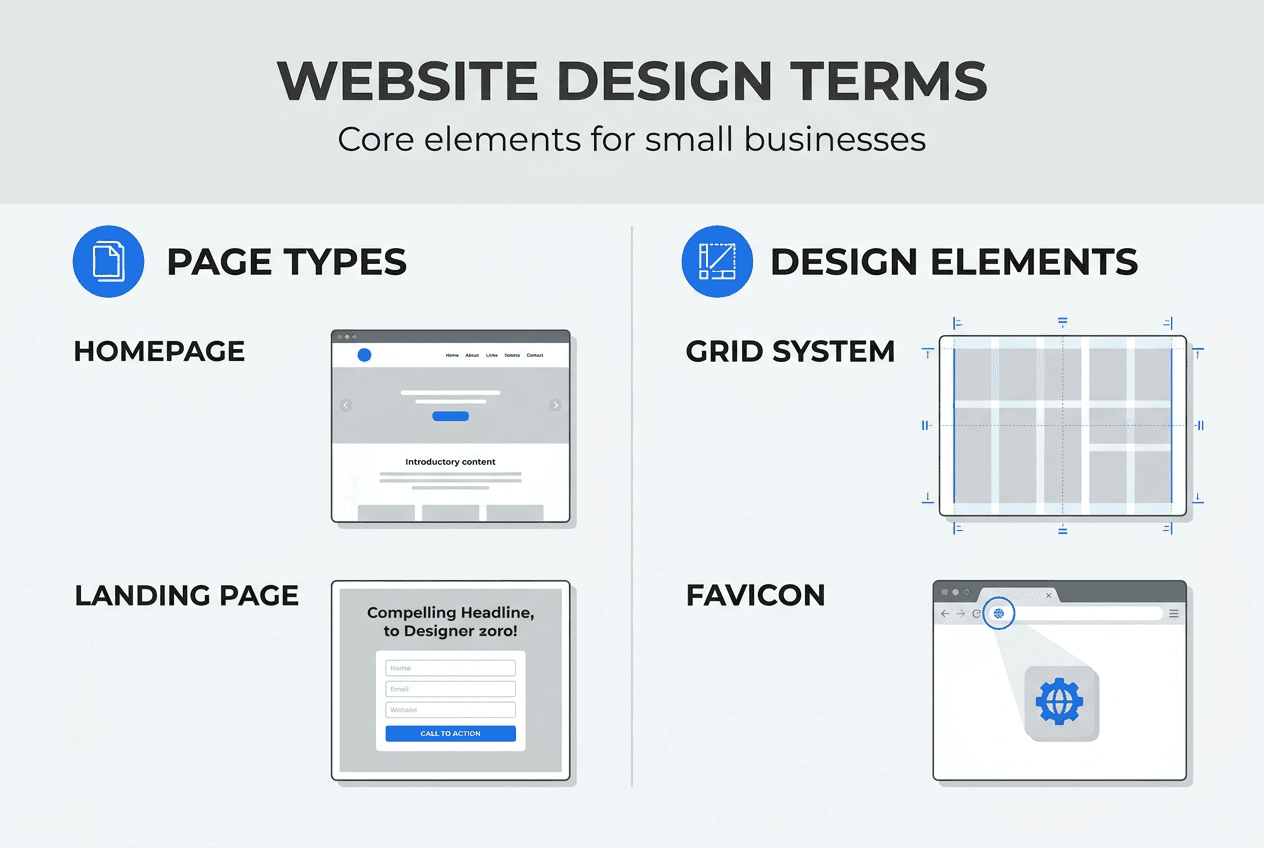
Your favicon is the tiny icon appearing in browser tabs next to your page title. While small, it reinforces brand recognition when visitors have multiple tabs open. Terms like grid system, favicon, and hero section guide user attention and enhance readability, making your site more effective.
Spacing and layout consistency matter more than most business owners realize. Magic numbers refer to consistent spacing values used throughout your design, like 8px, 16px, 24px, creating visual rhythm. Using variables instead of hard coded values means spacing relationships stay logical even when you resize elements.
Here's how common layout elements function:
| Element | Primary Function | Impact on User |
|---|---|---|
| Grid system | Aligns content consistently | Creates visual order and professionalism |
| Hero section | Captures immediate attention | Communicates main value proposition quickly |
| White space | Separates content sections | Improves readability and reduces overwhelm |
| Favicon | Identifies site in browser tabs | Reinforces brand recognition |
| Breakpoints | Adjusts layout for screen sizes | Ensures usability across all devices |
Pro Tip: Avoid raw hard coded spacing values in your design specifications, as they make future updates difficult and create inconsistencies as your site grows.
Understanding these layout concepts helps you create an SEO friendly design that both users and search engines appreciate. Clean layouts with logical structure make content easier to crawl and index, improving your visibility in search results while providing better experiences for visitors.
How understanding website design terminology streamlines project communication and website success
Knowing the right terms transforms how you work with developers and designers, creating efficiency that saves time and money while producing better results. The benefits extend far beyond just sounding knowledgeable in meetings.
Here are five specific ways shared terminology improves your website projects:
- Faster decision making: When you understand options presented, you can evaluate proposals quickly without lengthy explanations or confusion
- Fewer revisions: Clear communication from the start means developers build what you actually want the first time, avoiding costly do overs
- Better problem solving: When issues arise, you can describe them precisely, helping your team diagnose and fix problems faster
- More accurate budgeting: Understanding what different features and elements involve helps you prioritize spending on what matters most
- Stronger collaboration: Speaking the same language builds trust and respect between you and your development team
Research confirms these benefits with hard numbers:
Projects with clear communication have a 30% higher success rate and are completed 20% faster than those with communication gaps, according to the Project Management Institute.
For small business owners working with limited budgets and tight timelines, these improvements make the difference between a website that drives growth and one that drains resources. Understanding why small business websites are vital motivates the investment in learning terminology, while that knowledge helps you avoid risks of DIY site builders that seem easy but create long term problems.
When you can discuss wireframes, responsive breakpoints, and conversion optimization confidently, developers take your input seriously. You become a true partner in the process rather than someone who just approves or rejects work without understanding it. This collaborative approach leads to websites that authentically represent your business and serve your customers effectively.
The terminology you've learned also helps you maintain your website over time. As you request updates, add new features, or troubleshoot issues, you can communicate needs clearly to whoever manages your site. This ongoing clarity prevents small problems from becoming expensive emergencies.
Boost your website success with professional design and SEO services
Now that you understand essential website design terminology, you're equipped to have productive conversations about your online presence. This knowledge forms the foundation for working effectively with professionals who can bring your vision to life.

Digital Biz Agent specializes in creating website design and SEO services tailored for Lubbock small businesses. We handle everything from initial design through launch and ongoing optimization, ensuring your site includes all small business website essentials while staying within your budget. Our team speaks your language and translates your business goals into effective web solutions.
Pro Tip: Plan to redesign your website every 2-3 years to keep pace with evolving web standards, user expectations, and search engine requirements that impact your visibility and credibility.
FAQ
What is the difference between a homepage and a landing page?
Your homepage serves as the main entry point to your entire website, offering navigation to multiple sections and providing an overview of your business. A landing page focuses on a specific campaign or conversion goal, typically with minimal navigation to keep visitor attention on one desired action. Landing pages work best for targeted marketing campaigns, while homepages introduce your full brand story.
Why is it important for small business owners to understand website design terms?
Understanding design terminology dramatically improves communication with developers, reducing misunderstandings that cause delays and costly revisions. When you speak the same language as your web team, projects move faster and produce better results aligned with your actual business goals. This knowledge also helps you evaluate proposals, make informed decisions about features and investments, and maintain your site effectively over time.
What does responsive design mean in website terminology?
Responsive design means your website automatically adapts its layout, images, and functionality to work perfectly on any device or screen size, from large desktop monitors to small smartphones. Elements resize, reposition, and sometimes hide or show based on available space, ensuring visitors get an optimal experience regardless of how they access your site. This approach is essential since most web traffic now comes from mobile devices.
How can I tell if my website loads fast enough?
Your website should load completely in under 3 seconds to keep visitors engaged, as 53% of mobile users leave if a site takes longer. Use free tools like Google PageSpeed Insights to test your site's loading speed and get specific recommendations for improvements. Regular speed testing helps you catch performance issues before they cost you customers and sales, which you can track through website traffic stats.