
Many Texas small business owners believe website design is simply about choosing colors and fonts. In reality, the design process fundamentally shapes how customers interact with your business online, affecting everything from first impressions to conversion rates. A strategic website design process determines whether your site becomes a powerful growth tool or a digital afterthought. This guide breaks down each phase of creating affordable, user-friendly websites that strengthen your online presence and support local entrepreneurship across Texas.
Table of Contents
- Understanding the website design process from start to finish
- How the website design process boosts your business's online presence
- Comparing DIY website builders versus professional design process
- When and why to redesign your business website
- How Digital Biz Agent supports Texas small business websites
- Frequently asked questions
Key takeaways
| Point | Details |
|---|---|
| Design impacts function | Website design process shapes usability, customer engagement, and business outcomes beyond visual appearance. |
| Structured approach saves money | Following clear steps ensures affordable, scalable sites tailored to your specific business needs. |
| Growth through experience | Professional design process enhances customer experience and competitive online presence. |
| Strategic redesign timing | Knowing when to refresh your site keeps you competitive and maximizes return on investment. |
Understanding the website design process from start to finish
The planning phase sets the foundation for everything that follows. You identify your target audience, define specific business goals, and map out features that align with the Texas local market. This stage involves competitor research, content strategy, and technical requirements gathering. Skipping thorough planning leads to expensive revisions and missed opportunities.
During the design phase, wireframes and prototypes bring your vision to life. Designers create user-friendly navigation structures that guide visitors naturally toward conversion actions. Brand identity elements like color schemes, typography, and imagery establish visual consistency. Mobile responsiveness gets prioritized from the start, ensuring your site works flawlessly on smartphones and tablets.
The development phase transforms designs into functional code. Developers build pages using modern frameworks that prioritize speed and search engine optimization. Clean code architecture ensures your site loads quickly and ranks well in local searches. Integration of contact forms, payment systems, and analytics tools happens during this critical stage.

Testing and launch involve rigorous quality assurance across devices and browsers. Teams check every link, form submission, and interactive element. Performance optimization ensures fast load times that keep visitors engaged. Security measures protect customer data and build trust. The launch process includes final content reviews and backup systems.
Maintenance keeps your site relevant and secure long after launch. Regular updates address security vulnerabilities and compatibility issues. Content refreshes maintain accuracy and engagement. Performance monitoring identifies slowdowns or technical problems before they impact customers. This ongoing phase protects your initial investment.
Pro Tip: Allocate 30% of your total project budget to the planning phase. Clear requirements and thorough research prevent costly changes during development and ensure your site meets actual business needs rather than assumptions.
Key steps in the design process include:
- Requirements gathering and business goal alignment
- User experience mapping and wireframe creation
- Visual design and brand identity development
- Front-end and back-end development with SEO integration
- Cross-browser testing and performance optimization
- Launch preparation and post-launch monitoring
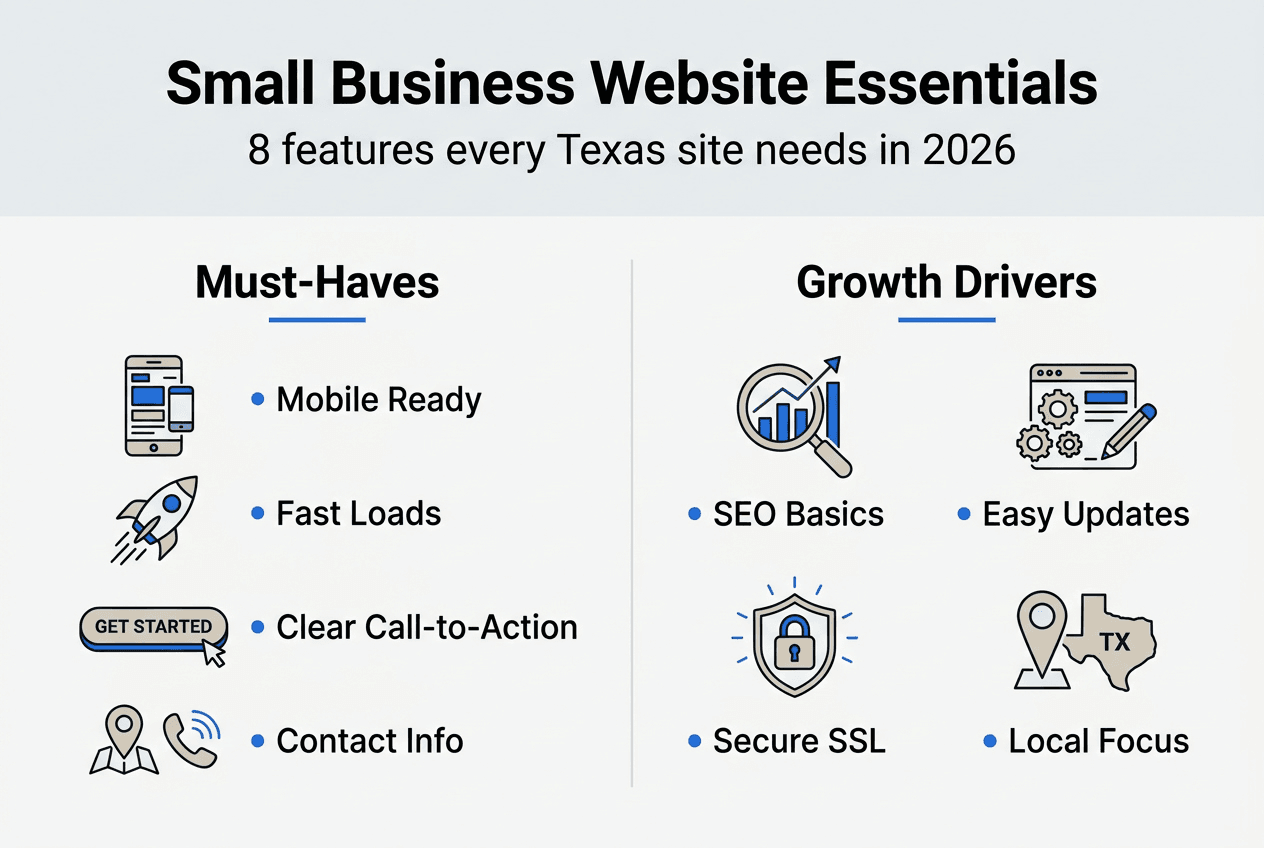
Understanding 8 things every small business website needs helps you evaluate whether your design process covers essential elements. Each phase builds on the previous one, creating a cohesive system that serves both your business objectives and customer needs.
How the website design process boosts your business's online presence
A thoughtful design process directly targets user experience to reduce bounce rates. When visitors find information quickly and navigate intuitively, they stay longer and explore more pages. This increased engagement signals search engines that your site provides value, improving rankings. For Texas small businesses competing in local markets, these engagement metrics make the difference between being found or forgotten.
Higher engagement translates into tangible business results. More inquiries, phone calls, and sales happen when your site removes friction from the customer journey. User-friendly design increases customer trust and encourages visitors to take action. Clear calls to action, strategic content placement, and fast load times work together to convert casual browsers into paying customers.
Visual consistency and clear messaging build credibility within your community. Professional design signals that you take your business seriously and can deliver quality products or services. Local customers respond to authentic branding that reflects Texas values and understands regional preferences. Cohesive design elements across all pages reinforce your brand identity and create memorable experiences.
Mobile-friendly design captures the growing smartphone audience searching for local businesses. Over 60% of local searches happen on mobile devices, making responsive design essential rather than optional. Touch-friendly buttons, readable text without zooming, and simplified navigation accommodate on-the-go users. Poor mobile experience drives potential customers straight to competitors.
Local SEO integrated throughout the design process improves visibility for nearby customers. Strategic placement of location keywords, optimized meta descriptions, and schema markup help search engines connect your business with relevant local queries. Fast loading speeds and mobile optimization directly impact local search rankings. These technical elements work invisibly to bring qualified traffic to your site.
"Websites that prioritize user experience see 400% higher conversion rates compared to those focused solely on aesthetics. Strategic design processes that balance visual appeal with functionality consistently outperform template-based approaches in customer engagement and business growth metrics."
The compounding benefits of professional design become clear over time:
- Improved search rankings drive consistent organic traffic without ongoing ad spend.
- Enhanced credibility reduces customer acquisition costs through word-of-mouth referrals.
- Better user experience increases average order values and repeat purchase rates.
- Mobile optimization captures revenue from the fastest-growing segment of online shoppers.
- Strategic content placement guides visitors toward high-value conversion actions.
Understanding reasons why small business websites are vital reinforces how design process choices impact overall business success. Each design decision either supports or undermines these strategic advantages.
Comparing DIY website builders versus professional design process
DIY website builders attract small business owners with low upfront costs and simple drag-and-drop interfaces. Platforms like Wix, Squarespace, and GoDaddy promise quick results without technical knowledge. These tools work for basic online presence but reveal significant limitations as businesses grow. Template restrictions prevent unique branding that differentiates you from competitors using identical layouts.
Professional design processes offer expert guidance tailored to your specific business model and growth plans. Experienced designers understand user psychology, conversion optimization, and technical SEO requirements that DIY tools overlook. Custom solutions scale with your business, adding features and functionality as needs evolve. Ongoing support ensures problems get resolved quickly without frustrating troubleshooting sessions.
DIY site builders often fail to deliver effective results for small businesses needing unique, scalable websites. Hidden costs accumulate through premium features, transaction fees, and limited customization options. Technical constraints prevent advanced functionality like custom checkout flows or integrated booking systems. Search engine optimization suffers from bloated code and limited control over technical elements.
| Feature | DIY Website Builders | Professional Design Process | | --- | --- | | Initial Cost | $10-30/month | $500-3000 upfront or $50-150/month | | Customization | Limited templates | Fully custom design | | SEO Capability | Basic, restricted | Advanced, optimized | | Scalability | Difficult, platform-locked | Easy, flexible growth | | Technical Support | Generic help articles | Direct expert assistance | | Load Speed | Often slow, bloated | Optimized for performance | | Ownership | Platform dependent | Full code ownership |
The comparison reveals fundamental differences in long-term value. DIY solutions seem affordable initially but cost more through lost opportunities and platform limitations. Professional processes require higher upfront investment but deliver better returns through superior performance and flexibility. Your choice depends on whether you prioritize immediate savings or sustainable growth.
Pro Tip: Calculate total cost of ownership over three years, not just monthly fees. Include lost revenue from poor SEO, conversion rate differences, and time spent managing technical issues. Professional design often costs less when factoring in business results and opportunity costs.
Understanding why DIY site builders are bad for small businesses helps you make informed decisions about your web presence investment. The right choice aligns with your growth ambitions and resource availability.
When and why to redesign your business website
Website redesigns become necessary when your current site no longer serves business objectives or customer expectations. Outdated design aesthetics signal to visitors that your business might be behind the times in other areas too. Slow load times frustrate users and hurt search rankings as Google prioritizes fast, responsive sites. Poor mobile experience alienates the majority of potential customers searching on smartphones.
Changing business goals often outpace your website's capabilities. Expanding product lines, entering new markets, or shifting target audiences require different messaging and functionality. Your site should evolve alongside your business strategy rather than constraining growth opportunities. Technical debt accumulates over years, making older sites vulnerable to security breaches and compatibility issues.
Redesigning at the right time improves user engagement metrics and supports business growth. Industry standards suggest evaluating redesign needs every two to three years, though specific timing depends on your situation. Data-driven decisions based on analytics reveal when performance drops signal the need for updates.
| Industry Type | Typical Redesign Frequency | Key Performance Indicators | | --- | --- | | Retail/E-commerce | 18-24 months | Conversion rate, cart abandonment | | Professional Services | 24-36 months | Contact form submissions, bounce rate | | Restaurants/Hospitality | 24-30 months | Mobile traffic, reservation completions | | Technology/SaaS | 12-18 months | User engagement, feature adoption |
Recognize these warning signs that indicate redesign urgency:
- Traffic declining despite consistent marketing efforts
- Bounce rates exceeding 60% on key landing pages
- Mobile traffic growing but conversions dropping
- Competitors outranking you with newer, faster sites
- Security warnings or outdated CMS versions
- Customer complaints about site usability or speed
- Brand identity changes not reflected online
Well-planned redesigns protect existing SEO value through proper redirects and content migration. Maintaining URL structures where possible preserves link equity and search rankings. Strategic updates improve performance without starting from zero. The redesign process follows similar phases as initial design but leverages existing data and customer insights.
Timing redesigns strategically around business cycles maximizes impact. Avoid major updates during peak sales seasons when technical issues could disrupt revenue. Plan redesigns during slower periods when you can focus on testing and refinement. Budget for redesigns as part of regular business expenses rather than emergency reactions to problems.
Understanding how often should you redesign your website helps you plan proactively rather than reactively. Regular evaluation prevents your site from becoming a liability instead of an asset.
How Digital Biz Agent supports Texas small business websites
You've learned how strategic design processes create competitive advantages for Texas small businesses. Digital Biz Agent specializes in transforming these concepts into affordable, high-performing websites tailored to local entrepreneurs. Our team understands the unique challenges facing Texas small businesses and delivers solutions that balance professional quality with realistic budgets.

Our website design and SEO services combine technical expertise with local market knowledge. We guide you through each phase of the design process, from initial planning to ongoing maintenance. Quick turnaround times mean you can launch in as little as one week without sacrificing quality or functionality. Scalable pricing plans starting at $25 monthly for landing pages and $50 monthly for full websites make professional design accessible.
Explore our resources on small business website essentials to understand what features drive results. Learn about optimal timing through our website redesign guidance to plan your investment strategically. Contact Digital Biz Agent today to discuss how we can strengthen your online presence and support your business growth across Texas.
Frequently asked questions
What is the typical timeline for the website design process?
Most small business website projects take six to twelve weeks from initial consultation to launch. Simple sites with standard features complete faster, while complex e-commerce or custom functionality extends timelines. Clear communication during planning helps set realistic expectations and prevents delays. Professional website design services can accelerate timelines significantly compared to DIY approaches by leveraging established workflows and technical expertise.
How does a good website design process improve SEO for my small business?
Integrating SEO considerations from the start ensures your site structure, content, and technical elements align with search engine requirements. Professional design processes build fast load times, proper metadata, and mobile optimization into the foundation rather than adding them later. This approach saves costs by avoiding expensive retrofits and establishes strong search visibility from launch. Early SEO integration positions your business to compete effectively in local search results where customers discover services.
What are the cost considerations for a professional website design process?
Costs vary based on complexity, required features, and ongoing maintenance needs. Simple brochure sites start around $500 to $1,500, while e-commerce or custom applications range from $2,000 to $5,000 or more. Investing properly in the planning phase prevents costly redesigns or functionality fixes later. Affordable options exist specifically tailored for Texas small business budgets without sacrificing essential quality or performance. Understanding professional website design pricing helps you budget appropriately and compare value rather than just initial costs.
Can I update my website content myself after the design process is complete?
Most professional websites include content management systems that allow you to update text, images, and basic page elements without technical knowledge. Training and documentation ensure you feel confident making routine changes independently. More complex updates involving layout changes or new functionality typically require developer assistance to maintain site integrity. This balance gives you control over day-to-day content while protecting your investment in professional design and functionality.
How does mobile responsiveness fit into the website design process?
Mobile responsiveness gets built into every phase rather than added as an afterthought. Designers create layouts that adapt fluidly across screen sizes from the initial wireframe stage. Developers test functionality on actual devices throughout the build process to ensure touch interfaces work properly. This mobile-first approach reflects how most customers now discover and interact with local businesses online, making it essential rather than optional for Texas small business success.