TL;DR:
- Small businesses in Texas can launch a bilingual website in as little as one day using affordable tools.
- Essential steps include domain registration, hosting, content creation, and basic SEO optimized for local search.
- DIY website builders suit quick, low-budget launches, while agencies offer more customization and support for complex needs.
Getting your business online in Texas does not have to take weeks or cost thousands of dollars. Many local entrepreneurs stall out waiting for the "perfect" site, losing real customers to competitors who simply showed up first. This guide walks you through every step of launching a fast, affordable, and bilingual website for your Texas small business. You will learn what tools to use, what to skip, and how to go live in as little as one day without overspending or overcomplicating the process.
Table of Contents
- What you need to launch fast: The essential checklist
- Step-by-step: Launching your website in one day
- Choosing the right solution: Builders vs. WordPress vs. Texas agencies
- Quick launch SEO and bilingual best practices
- Final checks and ongoing success: Testing, launch, and next steps
- Real-world lessons: What actually moves the needle for Texas small businesses
- Ready to launch? Get expert help for a faster, stronger Texas website
- Frequently asked questions
Key Takeaways
| Point | Details |
|---|---|
| Speed is possible | You can launch a bilingual website for your Texas business in just one day using modern tools. |
| Essentials matter most | Focusing on critical features and local SEO gets you results faster than aiming for perfection. |
| Bilingual pays off | Offering both English and Spanish content brings more local traffic and higher conversion rates. |
| Choose the right approach | Pick between DIY, WordPress, or agency based on your budget, needs, and growth plans. |
| Ongoing checks ensure success | Testing your site and monitoring early are key to building long-term online presence. |
What you need to launch fast: The essential checklist
Before you touch a single design template, you need the right building blocks in place. Skipping this step is where most business owners waste time. Get these essentials sorted first, and the rest of the process moves much faster.
Here is what you need at minimum:
- Domain name: Choose a short, memorable name that reflects your business. Register it through GoDaddy, Namecheap, or Google Domains. Expect to pay $10 to $15 per year.
- Hosting: Select a hosting provider that offers fast load times and supports multiple languages. Hostinger and Bluehost are solid options for Texas-based small businesses.
- Website builder: Pick a platform you can actually use. Wix, Webnode, and Squarespace all offer Spanish/English support out of the box.
- Core bilingual content: You do not need every page translated on day one. Start with your homepage, services page, and contact page in both English and Spanish.
- Basic SEO setup: This means writing a page title, meta description (a short summary Google shows in search results), and connecting your site to Google Search Console.
- A Google Business Profile: This is free and critical for local visibility in Texas cities like Lubbock, El Paso, or San Antonio.
The core steps for a quick website launch include domain registration, hosting setup, builder selection, content creation, SEO basics, testing, and post-launch monitoring. Following this sequence keeps you from jumping around and wasting hours.

When evaluating your options, review these modern website features that Texas businesses should include from the start. Also study these tips for Texas websites to understand what local customers expect.
Pro Tip: Launch your bilingual homepage first. A single page in both English and Spanish beats a half-finished ten-page site in just one language. Expand content as your business grows and you learn what visitors actually want.
| Option | Setup time | Cost estimate | Bilingual support | Best for |
|---|---|---|---|---|
| DIY builder (Wix/Webnode) | 1 to 3 days | $0 to $30/month | Built-in | Beginners, tight budgets |
| WordPress | 3 to 7 days | $10 to $50/month | Plugin required | Tech-savvy owners |
| Texas agency | 1 to 2 weeks | $500 to $3,000+ | Full custom support | Established businesses |
Step-by-step: Launching your website in one day
With your essentials gathered, the actual launch process is simpler than you think. Follow these steps in order and you can realistically have a live site by the end of the day.
- Register your domain (15 minutes). Go to GoDaddy or Namecheap. Search for your business name. Pick a .com if available, or try a .net or location-specific option. Pay and confirm.
- Sign up for hosting (20 minutes). Hostinger is a strong choice because sites on their platform load in 2.1 seconds on average with an 82 out of 100 mobile PageSpeed score. Connect your new domain to your hosting account using the nameserver settings they provide.
- Choose your template (30 minutes). Pick a template that fits your industry. A plumber, a restaurant, and a legal office all have different visual needs. Stick with clean, mobile-ready designs.
- Add your core pages (2 to 3 hours). Build at minimum: a homepage, a services page, an about page, and a contact page. Write each page in English first, then add the Spanish version immediately below or through your builder's language switcher.
- Use AI tools to speed up content (30 to 60 minutes). Many builders like Webnode now offer AI-assisted site creation, enabling 1-day AI builds for multilingual setups. Use these tools to generate initial copy, then personalize it with your real business details.
- Set up SEO basics (20 minutes). Add a title and description to each page. Connect Google Search Console. Submit your sitemap.
- Publish and test (30 minutes). Click publish. Check the site on your phone, on Chrome, and on Safari. Test every form and phone link.
Review the website workflow for Lubbock SMBs for a more detailed breakdown specific to Texas markets. You can also explore these website design steps to understand the full design sequence.
| Step | Time needed | Key outcome |
|---|---|---|
| Domain registration | 15 minutes | Secure your business name online |
| Hosting setup | 20 minutes | Site server ready to go |
| Template selection | 30 minutes | Professional visual foundation |
| Core page content | 2 to 3 hours | Bilingual pages live |
| SEO basics | 20 minutes | Google can find your site |
| Testing and publish | 30 minutes | Site verified and live |
Choosing the right solution: Builders vs. WordPress vs. Texas agencies
Now that you know the main launch steps, it is critical to choose the approach that fits your budget, skills, and future needs. Each option has real tradeoffs that matter more depending on where your business is right now.
DIY builders like Wix and Hostinger are fast and cheap, but they come with limits. You can build something professional-looking in a day, but scalability and customization are restricted. If you ever need a complex booking system, e-commerce with custom tax rules, or a highly unique layout, you may outgrow these platforms fast.
WordPress gives you far more flexibility. You can add almost any feature through plugins (add-on tools that extend what your site can do). However, WordPress has a steeper learning curve and carries risks around DNS management (DNS means the system that connects your domain to your website). If you switch hosting later, there is a real chance of downtime if not handled carefully.
Texas-based agencies like Digital Biz Agent cost more upfront but deliver polished, custom results with far less headache. For business owners who are not tech-savvy or who are launching a high-stakes business like a medical clinic or law firm, the investment makes clear sense.
Here is when each option makes the most sense:
- Choose a DIY builder if you need to get online within 24 hours, your budget is under $50/month, and your site needs are simple.
- Choose WordPress if you plan to scale your site significantly, need a blog or content strategy, and have some technical patience.
- Choose a Texas agency if your reputation depends on first impressions, you want bilingual support without doing it yourself, and you value ongoing maintenance and security.
Check out the known limitations of DIY builders before you commit. Also review this website features checklist to make sure whatever path you choose covers the basics.
Pro Tip: Start DIY if you need to move fast and funds are tight. But build your content strategy and branding with growth in mind. When your business scales, migrating to a more robust platform is much easier if your content is clean and organized from the start.
Caution: When switching platforms or hosting providers, never let your domain registration lapse or transfer DNS settings without a tested backup plan. Losing control of your domain can take your site offline for days and hurt your search rankings. Always confirm your new site is fully live before canceling your old hosting.
| Feature | DIY builder | WordPress | Texas agency |
|---|---|---|---|
| Setup time | Hours to 1 day | 3 to 7 days | 1 to 2 weeks |
| Monthly cost | $10 to $30 | $15 to $50 | $50 to $300+ |
| Bilingual support | Built-in | Plugin required | Fully custom |
| Customization | Low to medium | High | Very high |
| Ongoing support | Self-managed | Self-managed | Included |
Quick launch SEO and bilingual best practices
Once your website is live, do not miss these core tactics to stand out and serve all your local customers. SEO for a new site does not have to be complicated. Focus on fast wins first.
Here are the quick wins that actually move the needle:
- Claim your Google Business Profile. This is the single most impactful local SEO action for any Texas small business. It gets you on Google Maps and into the local search results box.
- Add your business to local citations. Sites like Yelp, Bing Places, and local Texas business directories help Google verify that your business is real and located where you say it is.
- Write unique title tags and meta descriptions for every page. Use your city name and main service keyword in each one. Example: "Affordable HVAC Repair in Lubbock, TX."
- Make sure your site loads fast on mobile. Over 60% of local searches in Texas happen on smartphones. Slow sites get penalized by Google and abandoned by visitors.
- Add structured data to your homepage. This is code (called schema markup) that tells Google exactly what your business does, where it is, and how to contact you. Many builders add this automatically.
For bilingual SEO specifically, use a language switcher (a button that lets visitors toggle between English and Spanish), and make sure each language version has its own distinct URL path, like yoursite.com/es/ for Spanish. This signals to Google that you have real content for Spanish-speaking users.
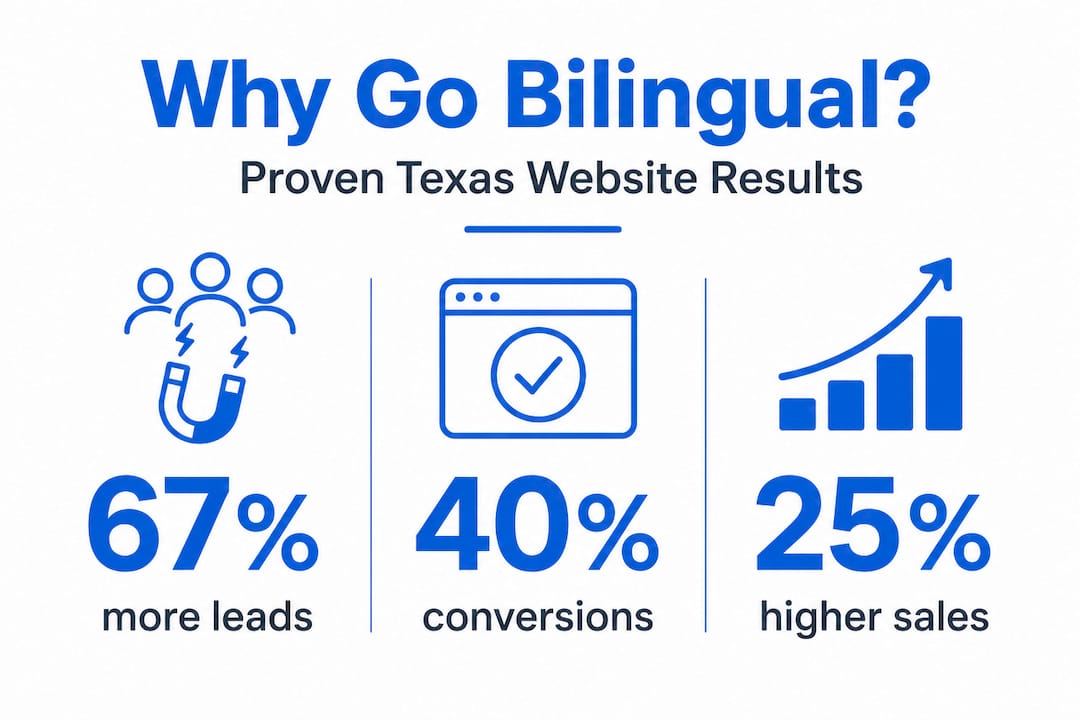
The impact is measurable. Multilingual sites see 67% more leads, 40% higher conversions, and 25% higher average order value. In Texas, where Spanish-speaking communities are large and growing, this is not optional if you want to compete.
Pro Tip: Start with a translated homepage and contact page. Even partial bilingual coverage builds trust with Spanish-speaking customers who may otherwise leave your site immediately.
Study these easy SEO tips built for Texas businesses, and review the must-have website elements every site needs to perform in search.
Final checks and ongoing success: Testing, launch, and next steps
Before you announce your new site, be sure these final checks are complete and you are set up for long-term results.
Pre-launch checklist:
- Click every link on every page. Broken links frustrate visitors and hurt SEO.
- Submit and test every form. Make sure contact form submissions actually reach your email.
- View your site on a phone, tablet, and desktop. Check that nothing overlaps or breaks.
- Read every translated section. Machine-translated Spanish text often has errors that undermine your credibility with native speakers.
- Confirm your page titles and meta descriptions are filled in for every page.
- Verify that your Google Analytics or Search Console tracking code is installed and reporting data.
Ongoing monitoring habits that take minimal time:
- Check Google Search Console weekly for crawl errors or index problems.
- Review Google Analytics monthly to see which pages get the most visits.
- Read customer reviews on your Google Business Profile and respond within 48 hours.
- Use free tools like PageSpeed Insights to monitor site load time after any major update.
The core steps for website monitoring are simple but easy to skip once launch excitement fades. Build them into a routine.
Pro Tip: Schedule a one-week website review right now. Set a calendar reminder for seven days after launch. Check your analytics, test every form again, and identify one improvement to make. Small consistent updates beat occasional overhauls every time.
For more, follow this website maintenance process and these mobile traffic boost tips tailored to Texas markets in 2026.
Real-world lessons: What actually moves the needle for Texas small businesses
After working with small business owners across Texas, one thing stands out clearly: the business owners who wait for perfect never launch. The ones who launch fast, learn from real visitors, and improve over time consistently outperform the ones who spent three months designing a site nobody has seen yet.
Fancier is rarely better for local service businesses. A simple, fast-loading bilingual site that clearly states what you do, where you are, and how to reach you will outperform a visually stunning site with slow load times and no Spanish content. Local customers are not looking for art. They are looking for trust and answers.
The biggest missteps we see repeatedly: waiting until everything is perfect, ignoring the Spanish-speaking customer base entirely, and skipping mobile optimization because "most of my customers use desktop." That last assumption is almost always wrong in Texas markets.
Explore these step-by-step website design practices to build on a solid foundation. Launch something real, get it in front of customers, and let their actual behavior tell you what to improve next.
Ready to launch? Get expert help for a faster, stronger Texas website
You now have the knowledge to move fast. But if you want to skip the technical friction entirely and get a professional result the first time, that is exactly what we do at Digital Biz Agent.

We offer essential business website features built into every site we create, from mobile-ready design to bilingual content support and SEO setup. Our plans start at $25/month for landing pages and $50/month for full websites, with no large upfront agency fees. We provide a free demo before you commit, so you see exactly what you are getting. Understanding why websites matter for local business growth is step one. Taking action is step two. View our full website design and SEO services and let us handle the setup while you focus on running your business.
Frequently asked questions
Can I really launch a website for my Texas business in one day?
Yes, many DIY platforms and AI site builders now allow you to go live with a basic, professional site in just a few hours. Webnode enables 1-day AI builds and Hostinger delivers fast load speeds right out of the box.
Why is a bilingual website important for Texas businesses?
Multilingual sites generate 67% more leads and 40% higher conversions, making bilingual support a competitive advantage for Texas businesses serving Spanish-speaking communities.
What is the main difference between a DIY builder and hiring a Texas agency?
DIY builders are fast and cheap to start but offer less customization long-term, while agencies provide more tailored and scalable solutions with ongoing support included.
What is the most important SEO basic for a new local website?
Focus on optimizing for mobile speed and local search terms, and claim your Google Business Profile immediately. These two steps deliver the fastest visibility gains for new local sites.
How much technical skill is really needed to launch a bilingual website?
Most modern builders now make it easy to add and manage multiple languages through built-in tools and step-by-step setup wizards, even for beginners with no coding background.