
A one-second delay in your website loading time can cost you 7% of your conversions. That's real money walking away from your small business every day. Many Texas business owners think website optimization is a luxury reserved for big corporations with massive budgets, but the truth is far different. Website optimization is the process of improving your site's performance across multiple areas like speed, search engine visibility, user experience, and conversion rates. When done right, even small improvements can dramatically boost your online presence and sales. This guide breaks down what website optimization really means, why it matters for your bottom line, and how you can implement affordable strategies that deliver measurable results without breaking the bank.
Table of Contents
- Key Takeaways
- Understanding website optimization: the four pillars
- Why website speed matters for small businesses
- Affordable website optimization strategies for Texas small businesses
- Measuring and maintaining your website optimization success
- Get professional website optimization help for your small business
- Frequently asked questions
Key Takeaways
| Point | Details |
|---|---|
| Speed drives conversions | A one second loading delay can cost 7 percent of your conversions, making site speed a critical factor for revenue. |
| Four optimization pillars | Technical SEO, on page SEO, UX, and CRO form the foundational pillars that improve visibility and conversion rates. |
| Ongoing optimization | Website optimization is an ongoing process rather than a single fix, guiding where to invest time and money. |
| Affordable strategies | Affordable techniques exist that boost technical SEO, on page SEO, user experience, and conversions without breaking the bank. |
Understanding website optimization: the four pillars
Website optimization encompasses improving site performance across SEO, speed, UX, and CRO to boost search visibility and conversions. Think of it as tuning up your digital storefront so customers can find you easily, navigate smoothly, and complete purchases without friction. Each pillar addresses a specific aspect of your online presence.

Technical SEO forms the foundation. This pillar ensures search engines can crawl and index your site efficiently. Tasks include optimizing site speed, ensuring mobile-friendliness, fixing broken links, creating XML sitemaps, and implementing secure HTTPS protocols. When technical SEO is solid, search engines reward you with better rankings because they trust your site provides a quality experience.
On-page SEO focuses on content and structure. This includes strategic keyword placement in titles, headings, and body text, crafting compelling meta descriptions, optimizing images with descriptive alt text, and creating high-quality content that answers user questions. Every page should target specific search terms your customers actually use. Quality content that solves real problems naturally attracts both search engines and human visitors.
User experience (UX) determines whether visitors stay or leave. Clear navigation, intuitive design, readable fonts, logical information architecture, and mobile responsiveness all contribute to positive UX. Your site should work flawlessly on smartphones since most searches now happen on mobile devices. The things every small business website needs include these fundamental UX elements that keep visitors engaged.
Conversion rate optimization (CRO) turns visitors into customers. This pillar involves strategically placed calls to action, simplified checkout processes, trust signals like testimonials and security badges, and removing unnecessary steps that cause abandonment. Even small changes like button color or placement can significantly impact conversion rates.
Pro Tip: Start by fixing issues that improve both speed and user experience simultaneously. Optimizing images, for example, makes pages load faster while also improving visual appeal. This dual benefit delivers the best return on your optimization investment.
Why website speed matters for small businesses
Performance directly ties to revenue with 100ms latency costing 1% in sales, and benchmarks show 61% conversion lift after optimization. For a small business generating $10,000 monthly in online revenue, a half-second delay could mean losing $500 every month. That's $6,000 annually just from slow loading times.
Search engines factor speed into rankings. Google explicitly uses page speed as a ranking signal because they want to deliver the best possible results to users. Faster sites get preferential treatment in search results, meaning more visibility for your business. When two sites offer similar content, the faster one typically ranks higher.
User behavior changes dramatically with speed. Studies show 53% of mobile visitors abandon sites that take longer than three seconds to load. Every additional second increases bounce rates exponentially. Visitors who leave immediately never see your products, services, or compelling content. They simply move on to a competitor with a faster site.
"After implementing core web vitals optimizations, our clients typically see conversion rates improve by 40-60% within the first month. Speed optimization isn't optional anymore, it's fundamental to staying competitive."
Common speed issues plague small business websites, but solutions exist:
- Oversized images account for most slow load times. Compress images to appropriate sizes before uploading and use modern formats like WebP.
- Excessive plugins or scripts bog down WordPress sites. Remove unused plugins and consolidate functionality where possible.
- Poor hosting infrastructure limits performance potential. Upgrade to quality hosting that matches your traffic needs.
- Missing browser caching forces repeat visitors to download everything again. Enable caching to store site elements locally.
- Unoptimized code creates unnecessary processing overhead. Minify CSS and JavaScript files to reduce file sizes.
The affordable website optimization steps texas smbs can implement focus heavily on speed improvements because they deliver immediate, measurable results. You don't need technical expertise to understand the problem or recognize when it's fixed. Faster pages simply feel better to use.
Affordable website optimization strategies for Texas small businesses
Budget constraints shouldn't prevent you from optimizing your website effectively. These practical strategies deliver results without requiring enterprise-level investment:
-
Conduct targeted keyword research using free tools like Google Keyword Planner or Ubersuggest. Identify terms your Texas customers actually search for, focusing on local intent like "plumber in Lubbock" or "Austin bakery delivery." Build content around these terms.
-
Update meta titles and descriptions across all pages. These elements appear in search results and influence click-through rates. Include your target keywords naturally while writing compelling copy that makes people want to visit.
-
Optimize site speed by compressing images, enabling caching, and removing unnecessary plugins. Use free tools like Google PageSpeed Insights to identify specific issues, then tackle the highest-impact fixes first.
-
Enhance user experience with clear navigation, mobile-responsive design, and readable content structure. Test your site on actual smartphones to ensure buttons are tappable and text is readable without zooming.
-
Add clear calls to action on every page. Tell visitors exactly what you want them to do next, whether that's calling your business, filling out a contact form, or making a purchase. Use action-oriented language like "Get your free quote" instead of generic "Submit."
-
Create location-specific content for Texas markets. Write blog posts addressing local customer concerns, showcase Texas-based projects or clients, and ensure your Google Business Profile is complete and optimized.
| Optimization strategy | Cost | Effort level | Expected impact |
|---|---|---|---|
| Keyword research and content updates | Free to $50/month | Medium | 20-40% traffic increase over 3-6 months |
| Meta tag optimization | Free | Low | 10-20% improvement in click-through rates |
| Image compression and caching | Free to $20/month | Low | 30-50% faster load times |
| Mobile UX improvements | Free to $200 | Medium | 15-30% reduction in bounce rates |
| Call to action optimization | Free | Low | 10-25% conversion rate improvement |
| Local SEO content | Free to $100/month | High | 25-50% increase in local search visibility |
Pro Tip: Track one metric at a time when implementing changes. If you modify three things simultaneously and see improvement, you won't know which change actually worked. Make one optimization, monitor results for two weeks, then move to the next priority.
The website design and SEO services landscape offers options for every budget. Some tasks like keyword research and content creation work well as DIY projects if you have time. Others like technical SEO audits or conversion rate optimization benefit from professional expertise. Evaluate your own skills and available time honestly when deciding which approach fits your situation.
Measuring and maintaining your website optimization success
Tracking the right metrics tells you whether optimization efforts are working or wasting resources. Focus on these key indicators that directly connect to business outcomes:
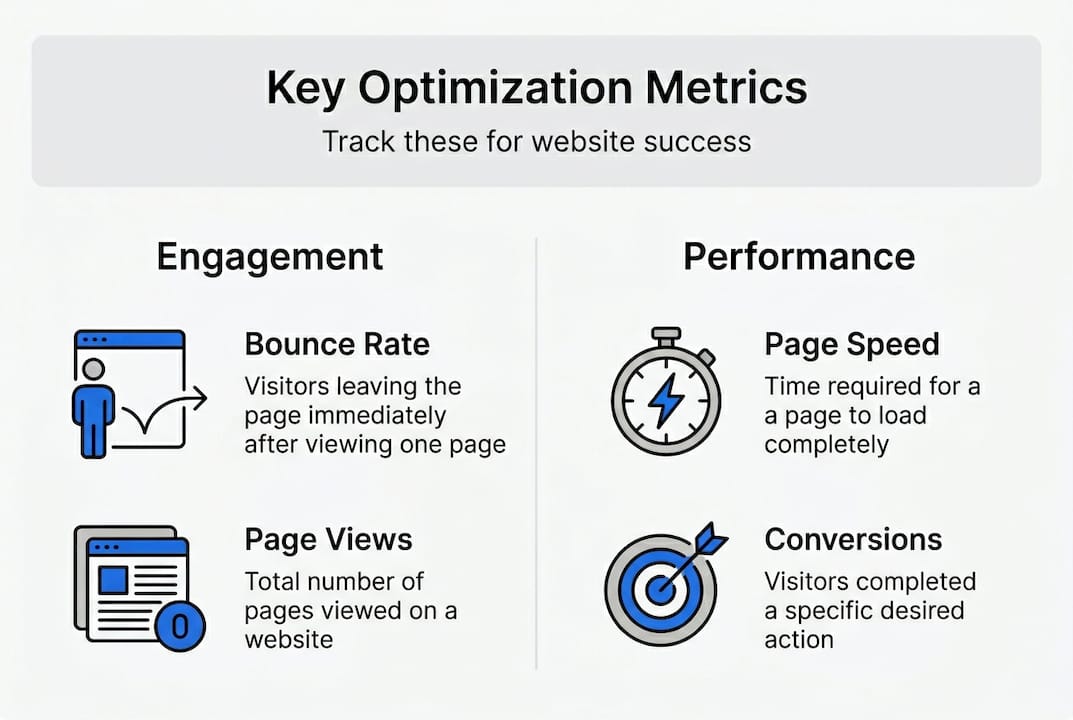
Page speed measures how quickly your site loads. Tools like Google PageSpeed Insights, GTmetrix, and Pingdom provide free speed tests with specific recommendations. Aim for load times under three seconds on mobile devices. Monitor speed monthly because new content or plugins can gradually slow performance.
Bounce rate shows the percentage of visitors who leave after viewing only one page. High bounce rates often indicate poor user experience, slow loading, or content that doesn't match search intent. Google Analytics tracks this metric for free. Rates above 70% signal problems needing attention.
Conversion rate tracks how many visitors complete desired actions like purchases, form submissions, or phone calls. This metric directly measures business impact. Even small improvements in conversion rate dramatically affect revenue. Calculate it by dividing conversions by total visitors and multiplying by 100.
Search rankings determine how easily potential customers find you. Track your position for target keywords using free tools like Google Search Console or affordable options like SEMrush. Rankings fluctuate, so monitor trends over months rather than obsessing over daily changes.
Performance directly ties to revenue with 100ms latency costing 1% in sales, making consistent monitoring essential. Set aside time monthly to review these metrics and identify emerging issues before they significantly impact results.
Maintenance best practices sustain optimization gains:
- Update content quarterly to keep information current and signal to search engines that your site remains active and relevant.
- Run technical audits every six months to catch broken links, crawl errors, or security vulnerabilities before they harm rankings.
- Review and refresh meta descriptions annually as your business evolves and customer needs change.
- Monitor Core Web Vitals monthly since Google uses these metrics for ranking decisions.
- Test user flows quarterly to ensure checkout processes, contact forms, and navigation still work smoothly.
- Back up your site weekly so you can quickly recover if updates cause problems.
Search algorithms constantly evolve, with major updates happening several times yearly. What works today might need adjustment tomorrow. Staying current doesn't require obsessive attention, but periodic reviews prevent your site from falling behind competitors. The affordable website design blog shares updates on algorithm changes and optimization strategies relevant to small businesses.
Ongoing optimization creates compounding benefits. Each improvement builds on previous work, gradually strengthening your online presence. Sites that receive consistent attention typically outperform those that get optimized once then neglected. Think of it like maintaining a vehicle rather than a one-time repair.
Get professional website optimization help for your small business
While DIY optimization works for some businesses, professional help accelerates results and frees your time for core business activities. Digital Biz Agent specializes in website design and SEO services tailored specifically for Texas small businesses facing tight budgets and aggressive timelines.

Our team handles the technical complexity while you focus on serving customers. We optimize site speed, implement proven SEO strategies, enhance user experience, and improve conversion rates using data-driven approaches. Clients typically see measurable improvements within 30-60 days, with rankings and traffic continuing to grow over time.
Transparent pricing means no surprises. Plans start at $50 monthly for complete website management including hosting, security, and ongoing optimization. You get professional-quality results without enterprise-level costs. We explain what we're doing and why, so you understand the value of every optimization.
Why choose professional optimization:
- Save 10-15 hours monthly you'd spend learning and implementing technical fixes
- Avoid costly mistakes that can actually harm rankings or user experience
- Access specialized tools and expertise that deliver faster, more comprehensive results
- Get ongoing monitoring and maintenance without adding to your workload
- Benefit from experience across hundreds of small business websites
The affordable website optimization steps texas smbs need don't require huge investments, just consistent attention and expertise. Our simple website pricing plans scale with your business, starting small and growing as your needs expand. Contact us today to discuss how optimization can boost your online presence and sales.
Frequently asked questions
What is website optimization?
Website optimization is the process of improving your site's performance across multiple dimensions including search engine visibility, loading speed, user experience, and conversion rates. It involves both technical improvements like faster servers and strategic enhancements like better content and calls to action. The goal is making your site work harder to attract visitors and convert them into customers.
What are the most important optimization techniques for small businesses?
Small businesses should prioritize mobile responsiveness since most searches happen on phones, site speed optimization because slow pages lose customers immediately, local SEO to capture nearby customers searching for your services, and clear calls to action that guide visitors toward contacting you or making purchases. These fundamentals deliver the biggest impact relative to effort and cost.
How does website optimization improve search rankings and conversions?
Optimization improves rankings by making your site easier for search engines to crawl, faster to load, and more relevant to user queries through targeted keywords and quality content. Better rankings bring more visitors, while optimization also improves conversion rates by removing friction points, building trust through professional design, and guiding visitors clearly toward desired actions. The combination of more traffic and higher conversion rates significantly boosts revenue.
How much does website optimization cost and how long does it take?
Basic optimization can cost nothing if you handle tasks yourself using free tools, while professional services typically range from $500 to $2,000 for initial optimization plus $50 to $500 monthly for ongoing maintenance. Timeline varies with site size and current condition, but most businesses see noticeable improvements within 30 to 60 days. Full results including significant ranking gains often take three to six months as search engines recognize and reward your improvements.
Should I optimize my website myself or hire professionals?
Choose DIY if you have technical skills, available time, and a limited budget for simple sites with straightforward needs. Hire professionals if your time is better spent running your business, you lack technical expertise, you need faster results, or your site has complex requirements like e-commerce functionality. Many businesses start with professional help to establish a strong foundation, then handle ongoing content updates themselves while leaving technical maintenance to experts.