
TL;DR:
- Regular website maintenance keeps sites secure, fast, and ranking well, preventing costly emergencies.
- Investing in a monthly maintenance plan boosts conversions, builds trust, and supports business growth.
- Choosing the right plan depends on your site functions, needs, and budget, with fixed monthly options being most effective.
Your website is not a billboard you hang once and forget. Many small business owners in Texas spend money building a site, launch it, and then walk away. That decision quietly costs them leads, sales, and credibility every single month. Neglected websites lose search rankings and visitors faster than most owners realize. This article breaks down what a website maintenance plan includes, how it directly impacts your bottom line, and how to pick the right option for your budget and goals.
Table of Contents
- What is a website maintenance plan?
- The business impact: From lost leads to more conversions
- Comparing website maintenance options
- How to choose the right website maintenance plan
- The overlooked payoff: Why maintenance is the unsung growth engine
- Ready to boost your online presence?
- Frequently asked questions
Key Takeaways
| Point | Details |
|---|---|
| Consistent website success | Website maintenance plans keep your site secure, fast, and reliable—crucial for attracting and converting visitors. |
| Better ROI | Maintained sites yield up to 20% more conversions and reduce long-term costs by spotting issues early. |
| Peace of mind | With ongoing maintenance, you avoid stressful surprises and stay focused on running your business. |
| Strategic advantage | Professional maintenance signals trustworthiness and gives you an edge over competitors with neglected sites. |
What is a website maintenance plan?
A website maintenance plan is a recurring service that keeps your site secure, updated, and running the way it should. Think of it like a monthly checkup for your business. Instead of waiting for something to break, a plan catches problems early and handles routine tasks before they become expensive emergencies.
Here is what a solid maintenance plan typically covers:
- Software and plugin updates: Websites built on platforms like WordPress rely on third-party tools. These tools release updates regularly, and skipping them opens security holes.
- Security monitoring: Active scans for malware, suspicious logins, and vulnerabilities keep your site from being used against your own customers.
- Automated backups: If your site crashes or gets hacked, a recent backup means you restore in hours, not weeks.
- Uptime monitoring: You get alerted the moment your site goes offline, instead of hearing about it from a customer.
- Performance checks: Page speed, broken links, and form functionality are reviewed so visitors have a smooth experience.
- Content support: Minor text updates, image swaps, and small edits keep your site current without you needing to learn a new system.
The alternative is the "fix it when it breaks" approach. This sounds cheaper until you get a $1,500 bill for emergency repairs after a hack, or you realize your contact form has been broken for three months and no leads came through. According to site performance data, 43% of small businesses invest in site performance improvements, which shows that competitive owners already understand this is not optional.
A maintenance plan also gives you access to a maintenance process guide so you know exactly what is being handled on your behalf. Transparency matters when you are trusting someone with your digital storefront.
The business impact: From lost leads to more conversions
Now that we have defined website maintenance, let us look at why it directly affects your business growth, especially in converting visitors to paying customers.
Picture a plumbing company in San Antonio. Their site loads slowly because the images were never optimized. A potential customer searches for emergency plumbing at 9 p.m., lands on the site, waits four seconds for it to load, and clicks back to find a competitor. That is a real sale lost. Not because of bad service, but because of a neglected website.

This is not a rare scenario. Maintained sites improve conversion rates by 7 to 20 percent compared to neglected sites. For a business generating $10,000 per month in online leads, that range means $700 to $2,000 in additional revenue just from keeping the site healthy.
Here is a side-by-side look at what maintenance impacts:
| Business area | Neglected site | Maintained site |
|---|---|---|
| Google ranking | Drops over time | Stable or improving |
| Page load speed | Slows as plugins age | Consistently fast |
| Security | Vulnerable to attacks | Actively protected |
| Conversion rate | Declines 5 to 15% | Improves 7 to 20% |
| Customer trust | Erodes with broken features | Stays strong and credible |
| Monthly repair costs | High and unpredictable | Low and fixed |
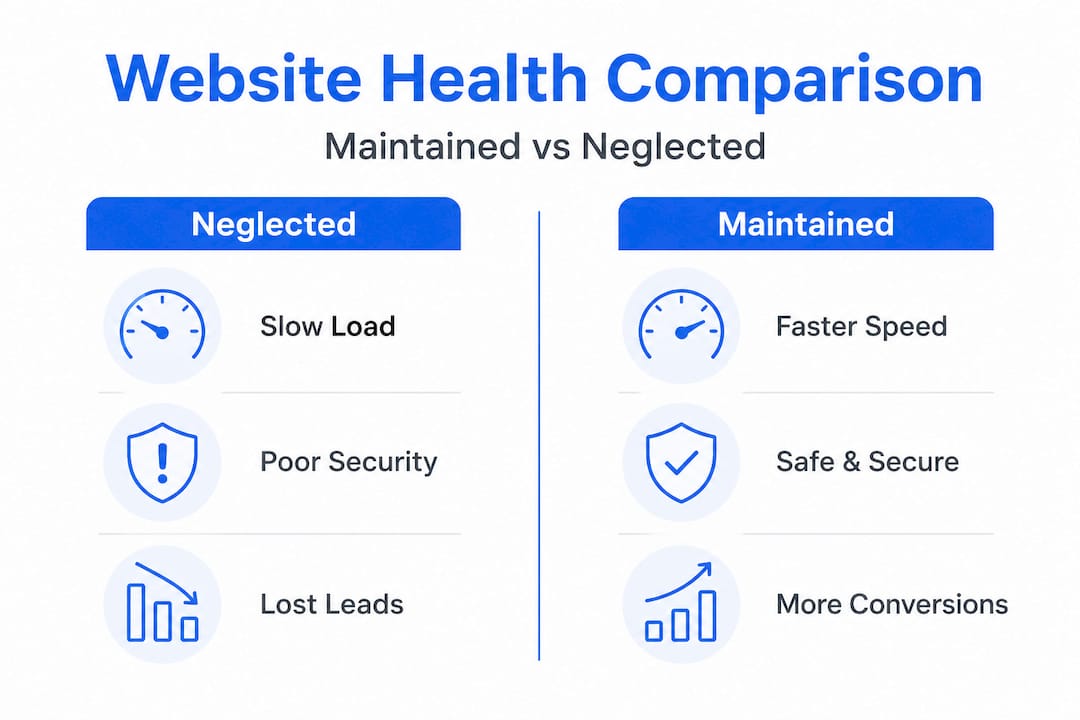
The cost of fixing problems after they explode is always higher than preventing them. A broken checkout process found during a routine check takes 20 minutes to fix. The same problem discovered after a week of zero orders could mean lost revenue and a frantic call to a developer charging emergency rates.
Key outcomes of consistent maintenance:
- Faster load times that reduce bounce rates (when visitors leave without clicking)
- Better SEO (search engine optimization) signals that keep you visible on Google
- Fewer downtime incidents that make you look unreliable
- Cleaner data from forms and tracking tools so you make better decisions
Pro Tip: Set a calendar reminder every quarter to visit your own website from a phone you have never used before. You will immediately notice what real visitors experience, from slow images to broken buttons.
"A well-maintained website is not just a technical achievement. It is a standing promise to your customers that you take their time and trust seriously." — Digital Biz Agent
Understanding why websites matter for small businesses helps frame maintenance not as a chore but as a core part of your growth strategy.
Comparing website maintenance options
But what options do you actually have when choosing how to keep your website up-to-date and secure?
Most Texas small business owners land in one of three situations: they handle it themselves, they call someone only when something breaks, or they pay for a monthly plan. Each choice has real tradeoffs.
| Option | Monthly cost | Time required | Risk level | Best for |
|---|---|---|---|---|
| DIY maintenance | $0 to $20 | 5 to 10 hours/month | High | Tech-savvy owners with time |
| Pay-as-you-go fixes | $100 to $500 per incident | Minimal until crisis | Very high | Sites rarely updated |
| Professional plan | $50 to $200/month | Near zero | Low | Most small businesses |
Here is a numbered breakdown of how each option actually plays out in practice:
-
DIY maintenance. You update plugins, check backups, and monitor security yourself. This works if you have a background in web development and can dedicate consistent hours each month. Most business owners cannot. One missed update can expose your site to vulnerabilities.
-
Pay-as-you-go fixes. You only call someone when the site breaks or you notice a problem. This feels cheaper until you see how much emergency developer time costs. Rates often run $75 to $150 per hour, and a single hack recovery can eat $500 or more.
-
Professional maintenance plan. You pay a fixed monthly fee and a trusted provider handles everything in the background. You stay focused on running your business. Plans from providers like Digital Biz Agent start at $50 per month, which is less than most business lunches.
Neglected sites lose leads and rankings regularly, which means the "do nothing" approach always carries a hidden cost. That cost shows up in missed calls, lower Google placement, and customers who bounce before they ever contact you.
Pro Tip: Ask any provider you consider for a sample monthly report. A good maintenance plan comes with documentation showing exactly what was checked, updated, and fixed. If they cannot show you a report, keep looking.
To see how maintenance fits into your overall digital strategy, explore website essentials every small business site needs. And if you are trying to attract local customers specifically, understanding how regular updates boost local SEO gives you another reason to prioritize this.
How to choose the right website maintenance plan
With choices in front of you, here is how to decide which website maintenance plan fits your Texas business.
Start with your business goals. Not every owner needs the same level of support. A solo consultant who updates their site twice a year has different needs than a restaurant posting weekly specials and taking online reservations. Get honest about what your site is supposed to do for your business.
Here is a step-by-step framework for making the right call:
-
List what your site does. Does it collect leads through forms? Process payments? Display a menu or portfolio? The more functions your site performs, the more there is to maintain and the more risk you carry if something breaks.
-
Identify your weakest areas. Are you uncertain about security? Frustrated by slow load times? Unsure if your backups even work? That gap points directly to what your plan needs to cover.
-
Match your stage to your plan. A startup may start with a basic plan covering security, backups, and uptime monitoring. A growing business adding new products or services needs more active content support and performance optimization. An established business should treat its site like a full-time asset requiring consistent attention.
-
Check what is actually included. Some plans charge $30 per month but only cover plugin updates. Others at $100 per month may include 24/7 security, backups, monthly reports, and up to two hours of content edits. Read the details carefully.
-
Look for transparent pricing. Hidden fees for "emergency fixes" or charges every time you request a change are red flags. A trustworthy provider lays out exactly what you get at each price point before you commit.
-
Prioritize local or bilingual support. For Texas businesses with Spanish-speaking customers or staff, having a provider that communicates in both English and Spanish is a practical advantage, not just a nice feature.
The risk of skipping this decision is real. Sites that lose leads due to neglect rarely recover their ranking without significant effort and cost. Catching problems early always beats rebuilding from scratch.
It is also worth reviewing common marketing mistakes small businesses make to make sure your website strategy is aligned with your broader growth goals.
The overlooked payoff: Why maintenance is the unsung growth engine
Most businesses treat website maintenance the way they treat insurance. They resent paying for it until they desperately need it. But the savviest small business owners in Texas see it differently. They view maintenance as an ongoing investment that builds trust, improves rankings, and makes scaling easier over time.
Here is the angle most articles skip: a well-maintained website is a signal. It tells your customers that you are organized, reliable, and professional. Visitors notice broken links, outdated copyright dates, and slow loading times even when they do not consciously register the words. The site experience shapes their first impression before they read a single sentence about your services.
This matters more than most owners realize. Maintained sites improve conversions by 7 to 20 percent, and much of that improvement comes from the subconscious trust visitors feel when a site works perfectly. Every button that works, every page that loads instantly, every form that submits without errors, all of it quietly builds the case that your business is worth hiring.
There is also a scaling argument that rarely gets made. Small problems on a website are cheap to fix. The same problems ignored for six months become expensive and disruptive. A business trying to grow while constantly fighting a broken website is like trying to build a house on an unstable foundation. Maintenance gives you a solid base so that when you are ready to add new pages, launch a promotion, or connect a new tool, the underlying site can handle it without falling apart.
We have seen this pattern repeatedly with small businesses across Texas. Owners who invest consistently in maintenance spend less time dealing with website crises and more time focusing on customers. That shift alone is worth more than most people calculate. Explore the full picture of business website value to understand how each piece connects.
Ready to boost your online presence?
If this article made you rethink how you are handling your website right now, you are not alone. Most Texas small business owners we talk to have never had a real maintenance plan in place. They built a site, crossed it off the list, and moved on. That changes when they see what consistent support actually delivers.

At Digital Biz Agent, we offer website design and SEO services tailored to small businesses that need real results without agency-level costs. Our maintenance plans start at $50 per month and include security monitoring, backups, updates, and performance checks. We also offer bilingual support for Texas businesses serving both English and Spanish-speaking customers. Whether your site is brand new or has not been touched in years, we make it easy to get back on track. Learn more about website importance for small business and take the next step toward a site that works for you every single day.
Frequently asked questions
How often should I update my website content and plugins?
Most experts recommend updating content and plugins at least once a month. Outdated content and software directly contribute to lost rankings and reduced visitor trust.
Can I handle website maintenance myself to save money?
DIY maintenance is possible, but most small business owners underestimate the time involved and the risk of missing a critical update. Poorly maintained sites consistently lose leads and see weaker search performance over time.
What is the biggest risk of skipping a maintenance plan?
The biggest risks are security breaches, unexpected downtime, and missed sales from broken features. Sites with higher conversion rates consistently belong to businesses that maintain them regularly, not those that fix issues only after they become visible problems.
Are website maintenance plans affordable for Texas small businesses?
Yes, most plans are structured to be cost-effective for small budgets. Fixing neglected site problems reactively almost always costs more than a consistent monthly plan, especially when security incidents or extended downtime are involved.